
Lighthouse alternative: know which page to speed up first
Lighthouse scores the speed and quality of a page, whenever you run it. Lysible takes that diagnosis, weighs it against your traffic and your Google data, and tells you which page to fix first, how long it takes and what you gain.
What Lighthouse alternative tracks the speed of your whole site?
Lighthouse is still the reference for scoring a page, but it does not tell you which page matters. Lysible builds on the Lighthouse score, weighs it against the traffic and conversions of your pages, and ranks the fixes by impact, with their effort and time. You start with the slow page that costs you customers.
Which one is right for you?
They do not meet the same need. Here is how to decide in two minutes.
- You ran Lighthouse, got an orange score, and don't know where to start.
- You want to know which slow pages actually get traffic.
- You want ongoing monitoring, without rerunning the audit by hand.
- You are a developer and want the detail of each audit, resource by resource.
- You are testing a page still in development, before it goes live.
- You want to build the audits into your deployment pipeline.
The comparison, point by point
What each one actually does, checked at the source on the date shown at the bottom of the page.
| What we compare | Lysible | Lighthouse |
|---|---|---|
| What is measured | ✓Lighthouse score, Core Web Vitals, technical SEO | ✓Performance, accessibility, best practices, SEO |
| Scope | ✓The whole site, page by page | ~One page per audit |
| Traffic of each page | ✓GA4 and Search Console read at the same time | ×Knows nothing about your audience |
| Order of the fixes | ✓By impact, with effort and time | ~By estimated effect on loading |
| Tracking over time | ✓Daily monitoring, alerts | ~Rerun it, or install Lighthouse CI |
| Reading the report | ✓In plain English, with Lysa | ~Technical vocabulary (LCP, TBT, CLS) |
| Testing before launch | ×Analyzes the live site | ✓Runs locally |
| Price | From €89 excl. VAT per month, free analysis with no account | Free |
What really changes day to day
Beyond the feature list, three differences you notice in the first week.
The slow page that matters, first
A page scoring 40 out of 100 that nobody visits can wait. Lysible weighs the score against traffic and conversions to decide the order.
A job sized before you start
Each fix comes with its effort, impact and time, for example: medium effort, high impact, twelve hours. You know what to hand to your developer.
A trend, not a snapshot
A Lighthouse score changes from one run to the next, depending on the network and the machine. Lysible tracks your pages over time and flags what is really getting worse.
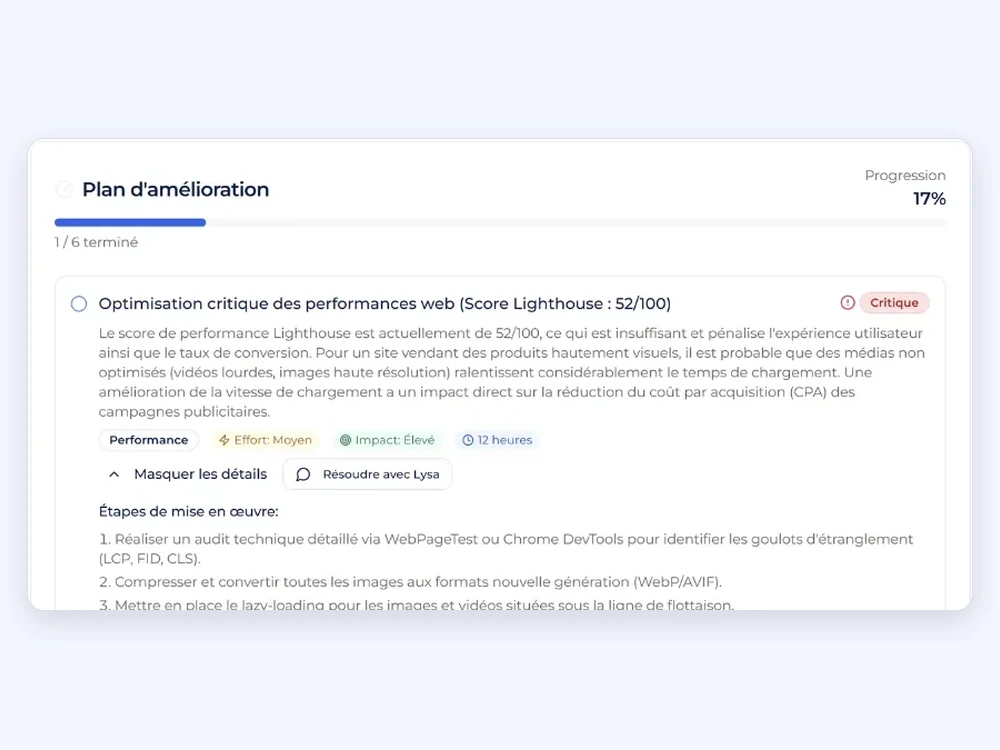
A Lighthouse score, turned into an action plan
Here, Lysible starts from a Lighthouse score of 52 out of 100 on an online store with heavy images. It explains what that costs, in visitor experience and in acquisition cost, then breaks the fix down into steps.
Medium effort, high impact, twelve hours: enough to decide whether you do it this week, and who should do it. Lysa can then walk you through it step by step.
What Lighthouse measures, and what it cannot know
Lighthouse loads a page under simulated conditions: a mid-range phone on a mobile network, or a desktop on a wired connection. It is a lab measurement, useful for comparing and for finding causes.
It varies from one test to the next, and Google says so itself: network, machine and background tasks move the result. Measurements from real visitors, over 28 days, only appear in PageSpeed Insights if the page has enough traffic.
Why a score is not enough to decide
Lighthouse ranks its suggestions by their estimated effect on loading the page tested. It does not know whether that page brings in customers or whether nobody visits it. Google, for its part, takes into account the Core Web Vitals measured on real visitors, not the Lighthouse score.
What Lysible does with the speed of your pages
Lysible reads the Lighthouse score and the Core Web Vitals of your pages, matches them with their traffic in GA4 and Search Console, and puts only the fixes that matter at the top. Our Core Web Vitals optimization guide details the most common fixes. For a first look, the free analysis measures your site's speed in thirty seconds, with no account.
Where Lysible is not the best choice
A comparison that finds no fault with its author is worth nothing. Here is what works in the other option's favor, and who it matters to most.
- Free and available everywhere. In Chrome, from the command line or through PageSpeed Insights, with no account to create.
- The full technical detail. Each audit points to the resources at fault: scripts, images, fonts. A developer finds everything they need there.
- Testing before launch. Lighthouse audits a page locally or on staging, and fits into a deployment pipeline.
Frequently asked questions
The questions we are asked most often on this topic.
Does Lysible use Lighthouse?
Yes. The Lighthouse score is one of the measurements Lysible reads on your pages, along with your Google Analytics 4 and Search Console data. The difference lies in what it does with it: it ranks the fixes by impact and tells you which one to start with.
Why does my Lighthouse score change with every test?
Because Lighthouse measures in a lab. The network, the machine and other running tasks make the result vary, as Google's documentation points out. Rely on a trend over several measurements, or on real-visitor data when PageSpeed Insights has it.
What is the difference between Lighthouse and PageSpeed Insights?
PageSpeed Insights runs Lighthouse on a page and, when traffic is high enough, adds measurements from real visitors over the last 28 days. Lighthouse alone only gives the lab measurement.
Does a good Lighthouse score improve my SEO?
Not directly. Google takes into account the Core Web Vitals measured on real visitors, not the Lighthouse score. A low score does point to a slow page, though, and a slow page loses visitors before it converts them.
Can I test my site for free?
Yes. Lysible's free analysis measures your site's speed, technical SEO and Core Web Vitals in thirty seconds, with no account, and gives three recommendations. The full trial lasts 30 days, with no credit card.
A score is not enough. Know which page to fix first.
One slow page that your customers visit comes before ten slow pages that nobody opens.